From Fragile to Fortified: Hardening Containers for Real-World Security
When I started my Cybersecurity in Virtualisation Systems module, I thought I knew container security. Spoiler: I didn’t. I had worked with Docker before, understood the basics of least privilege, and had even dabbled in some security best practices. But this module pushed me to take security hardening to a whole new level—transforming two vulnerable containers (a database and an app server) into hardened, resilient systems.
This wasn’t just an academic exercise; it was a deep dive into real-world security threats and defenses that directly align with the challenges Security Analysts and Cloud Security Engineers tackle every day.
The Problem: Containers Are Convenient, but Also Risky
Containers are fantastic for portability and scalability. But out-of-the-box, they come with security pitfalls: misconfigurations, excessive privileges, unpatched vulnerabilities, and secrets stored in plain text. My assignment was to take two standard containers—a MariaDB database and an Nginx-based web server, and apply industry-grade hardening techniques.
Think of it like fortifying a medieval castle: I needed strong walls, controlled entry points, and safeguards against inside and outside threats.
Key Takeaways
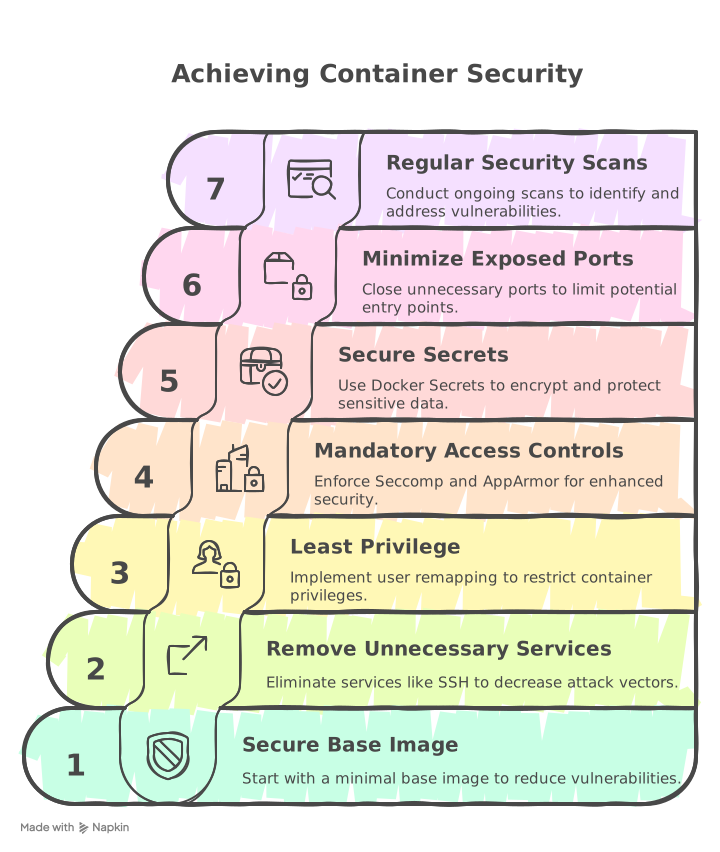
- Start with a minimal base image—less is more.
- Remove unnecessary services (like SSH) to reduce attack vectors.
- Use least privilege principles—never run containers as root.
- Mandatory Access Controls (Seccomp & AppArmor) are crucial.
- Manage secrets securely—use Docker Secrets, not environment variables.
- Minimize exposed ports—only open what’s necessary.
- Perform regular security scans (Trivy, Grype, Docker Bench Security).
The Approach: Layered Security Hardening
I tackled the problem using defense-in-depth, applying multiple layers of security across the build, pre-production, and runtime phases.
1. Choosing a Secure Base Image
# Enable Docker Content Trust to ensure only signed images are pulled
export DOCKER_CONTENT_TRUST=1

# Use a specific tag instead of 'latest' to avoid unexpected changes
FROM debian:slim
- Switched from CentOS 7 to Debian Slim for a smaller attack surface and faster security updates.
- Result: Reduced vulnerabilities from 2100 CVEs to 220, with only one critical CVE remaining.
2. Stripping Away Unnecessary Access
🔒 No More SSH
# Ensure SSH is not installed
RUN apt-get remove -y openssh-server
- Eliminated SSH access to prevent brute-force attacks and unauthorized entry.
🔑 Least Privilege (User Remapping)
# Create a non-root user for running the container
RUN useradd -m -s /bin/bash appuser
USER appuser
- Implemented user namespace remapping to restrict privileges even if a container is compromised.
# Configure Docker daemon to use namespace remapping
{
    "userns-remap": "default"
}
- Separated the Docker daemon process into a different PID namespace, making it appear as if it runs with root privileges while actually running as a non-root user.
3. Enforcing Mandatory Access Controls
🛡️ Seccomp Profiles
{
  "defaultAction": "SCMP_ACT_ALLOW",
  "syscalls": [
    {
      "names": ["rmdir", "chmod", "mount"],
      "action": "SCMP_ACT_ERRNO"
    }
  ]
}
- Blocked risky syscalls like
rmdir,chmod,mount, preventing attackers from modifying the container environment.
🛡️ AppArmor Security Policies
# Load AppArmor profile
apparmor_parser -r -W /etc/apparmor.d/containers/docker-nginx
- Applied AppArmor to limit web server access to only necessary files and directories.
4. Secrets Management & Network Security
🔐 Securing Secrets with Docker Secrets
# Store secrets securely in Docker Secrets
echo "dbpassword" | docker secret create db_password -
- No plaintext passwords—secrets are encrypted and only accessible to authorized containers.
🌐 Minimizing Exposed Ports
services:
  web:
    ports:
      - "80:80" # Only expose necessary ports
- Closed unnecessary ports (8004, 2375, 22) and kept only port 80 open for web traffic.
The Result: From Swiss Cheese to Secure Fortress
After applying these hardening strategies:
✅ Container Image Size Reduction → Leaner, faster, and more secure.
✅ Vulnerability Reduction → From 2100 CVEs to 220, with only one critical CVE.
✅ Stronger Access Controls → No root, no SSH, no excessive syscalls, strict AppArmor.
✅ Improved Security Posture → Database and web server now significantly harder to exploit.
Final Thoughts
This module wasn’t just about theory, it was real-world security hardening. The exact skills I applied here: container security, least privilege, access controls, vulnerability management, are the same ones companies expect Security Analysts and Cloud Security Engineers to master.
As I continue my cybersecurity journey, one thing is clear: a secure cloud infrastructure starts with secure containers. And now, I know how to build them.
Want to See the Full Hardening Process?
I’ve documented the full security configurations, including AppArmor profiles, Seccomp rules, and vulnerability scan reports. Feel free to reach out if you’re interested!