Mastering Security Architecture: Designing a Resilient Corporate Network
Introduction
In my journey through my MSc in Cyber Security Engineering, one of the most fascinating modules I encountered was Security Architecture and Network Defense. This wasn’t just about understanding network diagrams or configuring VLANs; it was about designing a resilient, scalable, and secure network that could withstand evolving cyber threats.
For my assignment, I built an internal network for a 200-employee tech company with five departments and secured VPN access for remote workers. The challenge? Balancing security, performance, and real-world constraints using Cisco Packet Tracer. Let’s break down the experience and why it matters for organizations—and potential employers looking for a Cloud Security Engineer who knows their way around robust architectures.
Designing a Secure Network: The Challenge
The fictional company, Quantum Byte Dynamics, had to ensure seamless connectivity, high availability, and ironclad security across its departments: Sales, R&D, Administration, and Server Management, with remote access for authorized personnel.
Key Constraints:
- Budget Limitations: No high-end, enterprise-grade hardware
- Security Priorities: Prevent unauthorized access, secure remote work
- Scalability: Network design must support future expansion
- Tool Limitations: Cisco Packet Tracer, while useful for simulation, restricted many real-world optimizations such as dynamic routing protocols, advanced firewall configurations, and integration with cloud-based security solutions.
I tackled these challenges by implementing:
- VLAN segmentation to restrict inter-department access
- Layer 3 switching for efficient routing
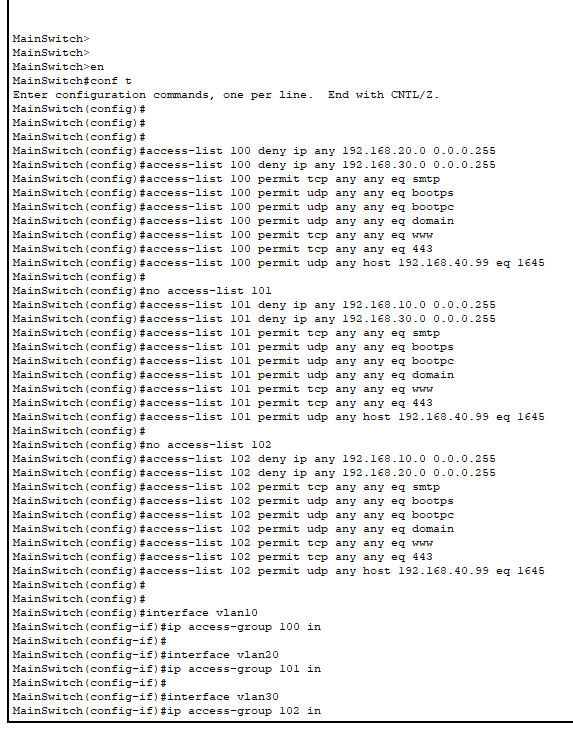
- Access Control Lists (ACLs) to limit exposure of sensitive data
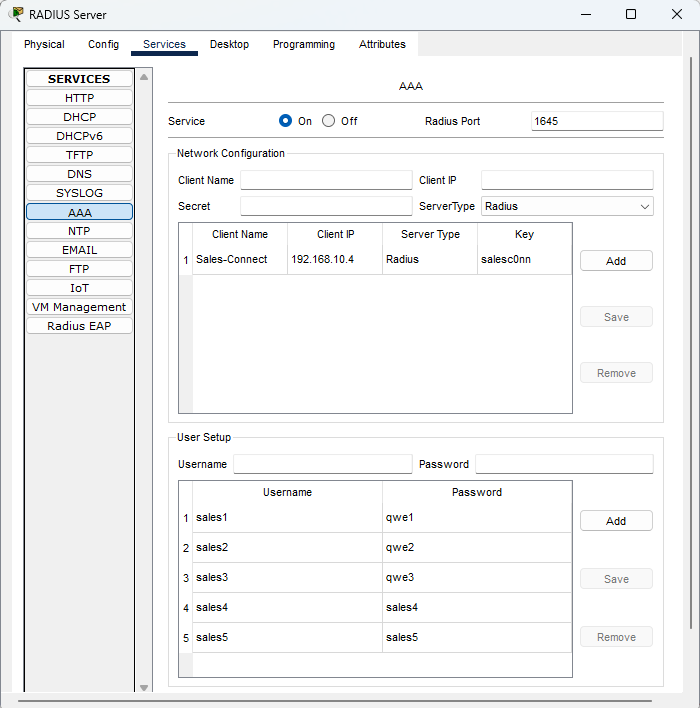
- AAA authentication (RADIUS) for remote and Wi-Fi access
- VPN for remote workers to securely connect to internal resources
Network Architecture: A Peek Under the Hood
📍 VLAN Segmentation
Dividing the network into VLANs ensured departments only had access to what they needed:
- VLAN 10 - Sales: Customer interaction tools, restricted access
- VLAN 20 - R&D: High-performance computing, access to internal dev tools
- VLAN 30 - Admin: Access to all configurations, financial records
- VLAN 40 - Servers: Hosting DNS, DHCP, VPN, and internal web services
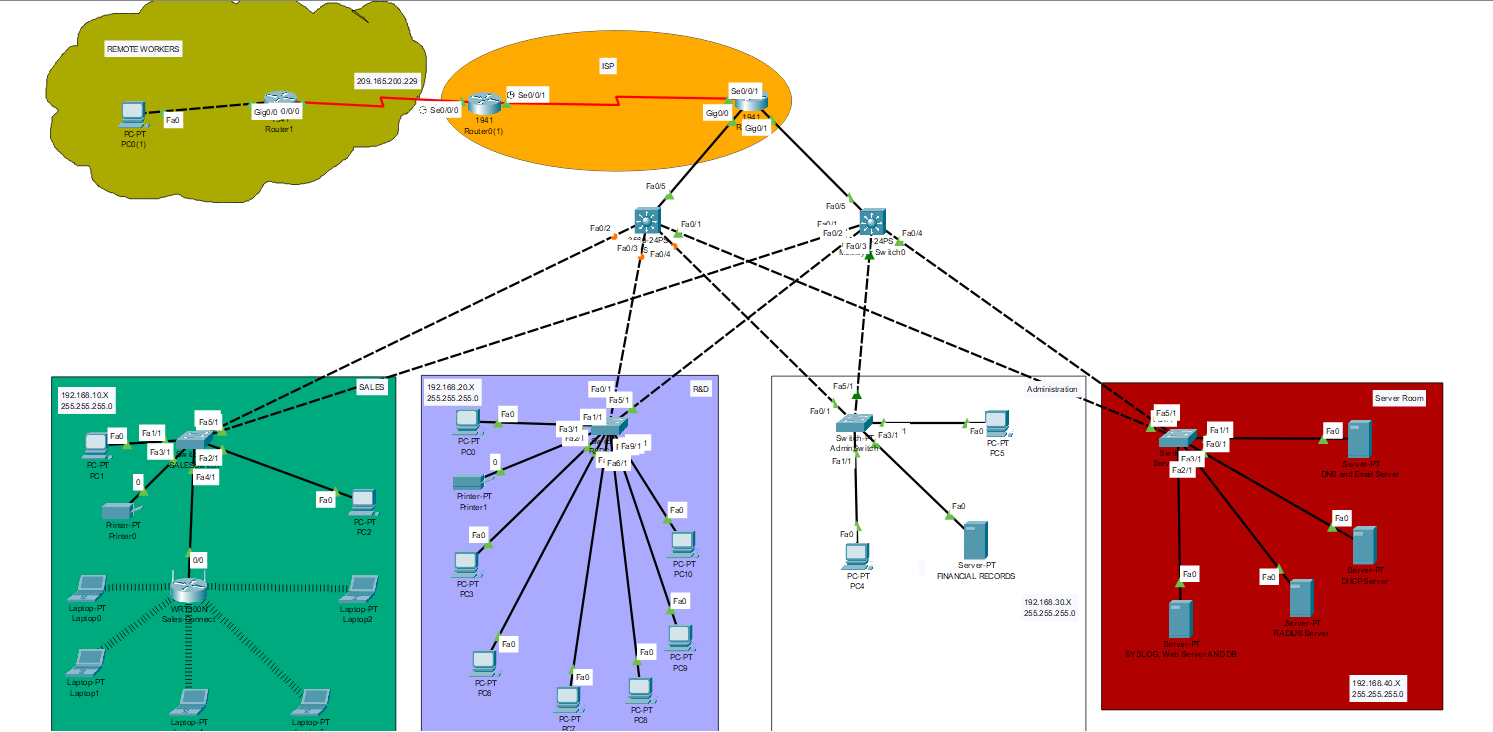
This setup enforced Zero Trust principles, ensuring that even within the company, users couldn’t access areas they weren’t authorized to.
🔒 Security Measures: Keeping Threats at Bay
Security is never an afterthought—here’s what I implemented to protect the network:
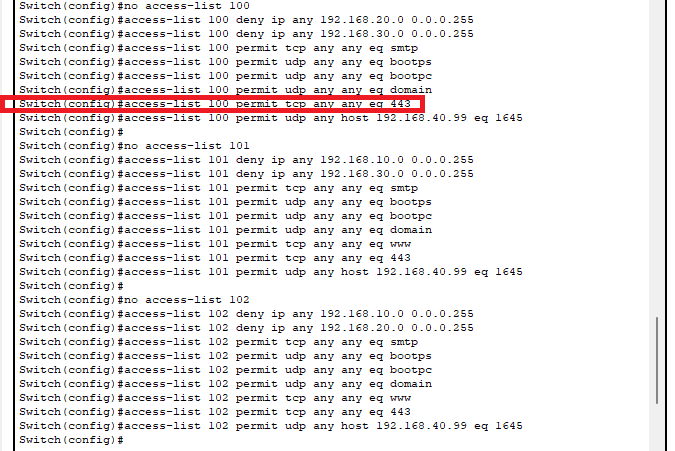
- ACLs for Inter-VLAN Restrictions
- Prevented lateral movement between departments
- Allowed only essential traffic (e.g., HTTPS but not HTTP)
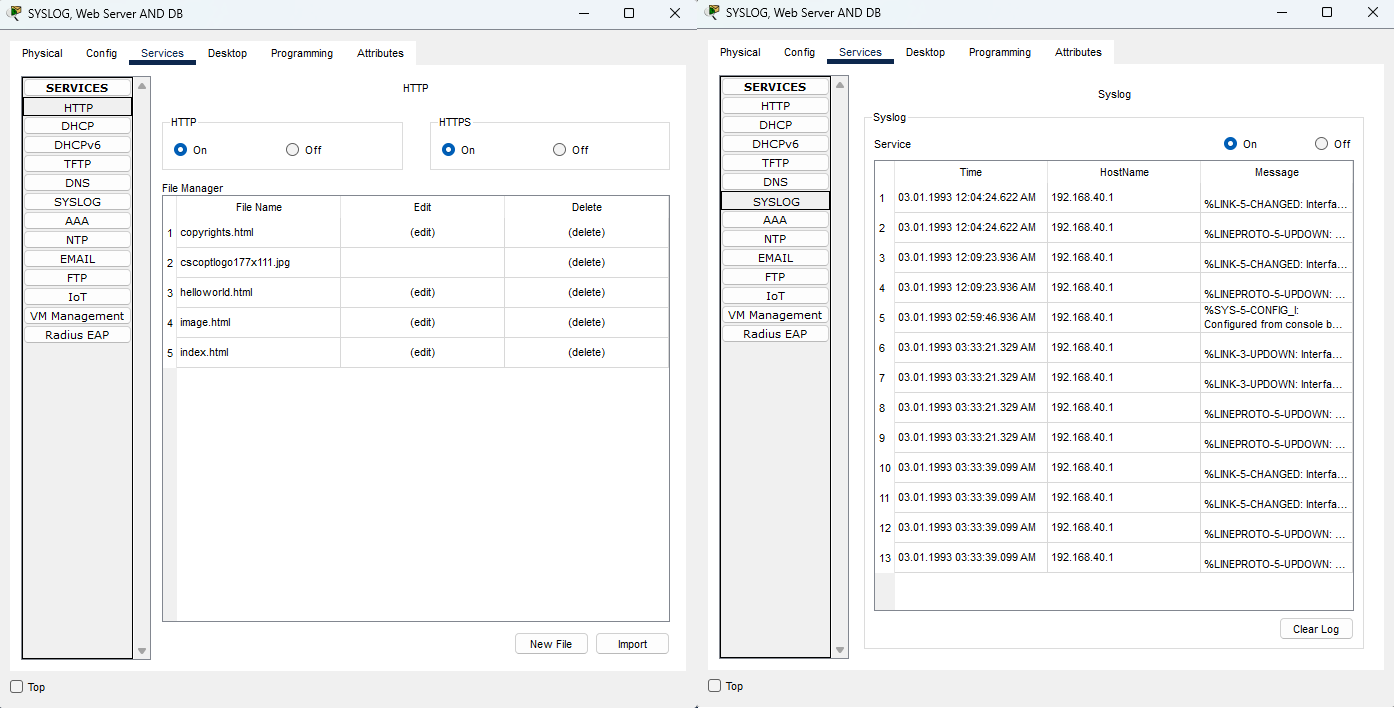
- Firewalls & Logging
- Implemented ACL-based firewalls for traffic filtering
- SYSLOG to monitor network events and detect anomalies
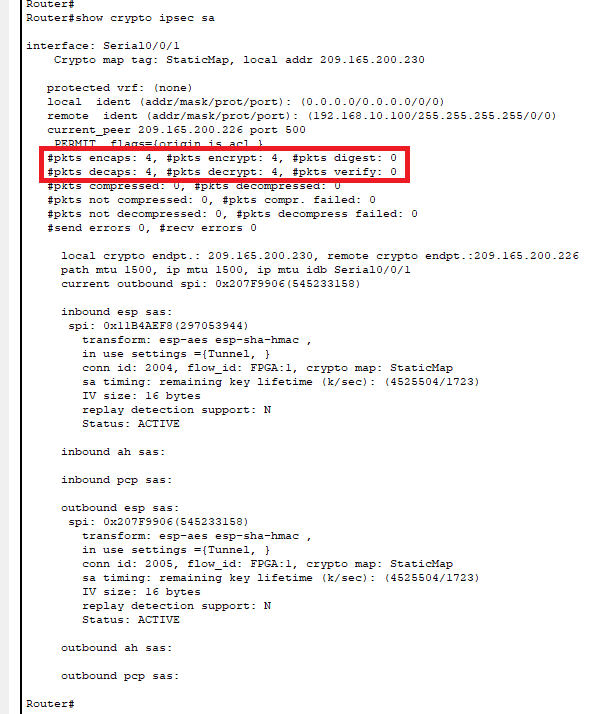
- Remote Access via VPN
- Configured IPSec-based VPN for secure remote work
- Used AAA authentication for identity verification
- Verified encrypted data transmission using
show crypto ipsec sa
VPN Configuration & Verification
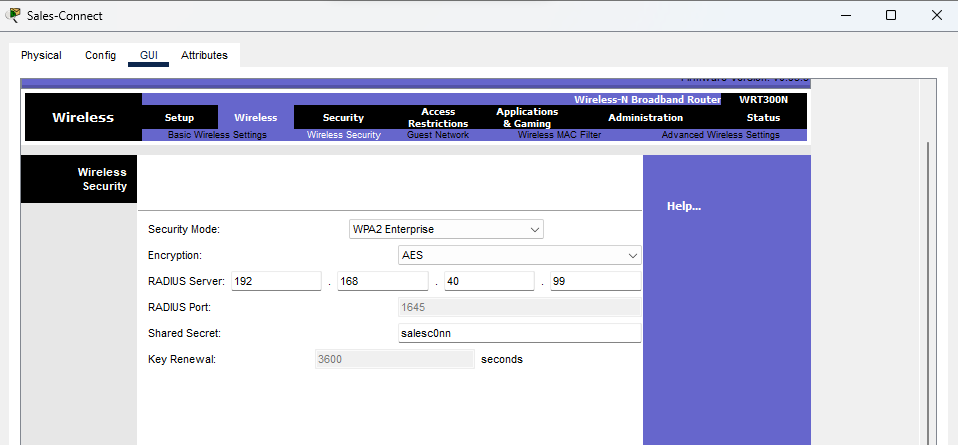
- Wi-Fi Security (WPA2-Enterprise)
- Used RADIUS authentication to prevent unauthorized access
- Applied MAC filtering and adjusted SSID range to limit exposure
Wireless Security Configuration | RADIUS Config
Lessons Learned: Bridging Academia and Industry
-
Scalability vs. Security: Designing a network that balances performance, budget, and security is an art. A scalable IP allocation strategy using DHCP and VLANs ensured the network could grow without redesign.
-
Defense in Depth: Relying on just one security measure is never enough. Implementing firewalls, ACLs, and authentication layers created a multi-layered defense against both internal and external threats.
-
Real-World Limitations: Cisco Packet Tracer is great, but real networks require enterprise-grade security solutions like SIEM, EDR, and cloud-based backups. In a professional setting, I’d integrate Microsoft Defender for Endpoint, Azure Sentinel (SIEM), and IAM policies for added resilience.
Additional Optimizations in a Cloud Environment (Azure)
Since cloud environments introduce new security challenges and require different approaches to network architecture, I have identified key optimizations necessary for an Azure-based implementation. Unlike traditional on-premise networks, cloud environments demand greater flexibility, automation, and advanced security policies to protect against evolving threats. A well-architected cloud network must support scalability, high availability, and compliance with security frameworks like NIST, CIS, and ISO 27001.
To ensure a robust security posture while leveraging cloud capabilities, the following optimizations should be considered in an Azure-based architecture:
- Azure Virtual WAN & ExpressRoute: For optimized and secure interconnectivity between on-prem and cloud resources, reducing latency and providing a private, dedicated connection instead of relying on the public internet.
- Azure Firewall & NSGs (Network Security Groups): To implement more granular access control, ensuring that only legitimate traffic flows between services while blocking unauthorized access attempts.
- Azure VPN Gateway & Conditional Access Policies: To secure remote access with identity-based restrictions, enabling access based on user roles, device health, and geographical location.
- Azure Defender & Sentinel: For enhanced monitoring, threat intelligence, and SIEM integration, allowing proactive threat detection, automated responses, and compliance enforcement.
- Zero Trust Model with Azure AD & Conditional Access: Ensuring users and devices are authenticated before granting access to critical resources, implementing least privilege access principles, and leveraging multi-factor authentication (MFA).
Final Thoughts
This project wasn’t just an assignment—it was an opportunity to apply security best practices in a practical scenario. It sharpened my skills in network defense, security architecture, and cloud security, aligning with my aspirations in Cyber Security.